-
Content Classification
At the core of Kestelwick is a classification process that assigns each item of information to an appropriate category within the system. Classification decisions are based on the subject matter, context, and relationships between items. An item may belong to more than one category where its content genuinely spans multiple areas.
The classification is not automated in an opaque way. Decisions follow a defined structure, and the resulting categories are visible to users through the navigation. If a classification appears incorrect or an item seems misplaced, users can raise a query through the enquiry form.
-
Structural Arrangement
Once classified, information is arranged within each category in a consistent order. The arrangement reflects the internal logic of the category — this may be chronological, thematic, or based on relevance to the category's defining subject. The arrangement is maintained as new items are added, so the category structure does not become disordered over time.
Users can rely on the arrangement to support comparison between items within a category. Consistent ordering makes it easier to identify gaps, trace sequences, or locate items whose approximate position within the structure is known.
-
Category Navigation
Kestelwick provides a navigation layer that maps directly onto the classification structure. The primary navigation presents the top-level categories, and each category can be entered to reveal its subcategories and individual items. Users can move between categories, return to higher levels, and navigate across different areas of the system without losing context.
The navigation is designed to remain consistent regardless of the device used to access the platform. It does not rely on features that may not be available in all browsing environments.
-
Information Review
Each item within Kestelwick is presented in a format designed for clear, uninterrupted reading. The review interface removes unnecessary elements so that the content itself is the primary focus. Informative labels and structural markers help users understand where an item sits within the broader classification without needing to return to the navigation each time.
The review function is not interactive in the sense of allowing annotations, ratings, or direct responses. It is a reading and examination environment, not a collaborative workspace.
-
Cross-Reference and Related Content
Where items within Kestelwick share a meaningful relationship, the platform indicates this through cross-references. These connections allow users to move from one item to related material without having to navigate back through the full category structure. Cross-references are added editorially and reflect genuine relationships rather than superficial keyword overlap.
This function supports users who are conducting a broader review of a subject area, rather than looking for a single specific item.
-
Enquiry and Access Management
Kestelwick includes a managed process for handling enquiries and access requests. Users can submit queries through the enquiry form, selecting a request type that helps the team direct their message to the right area. The team reviews incoming requests and responds with relevant information, clarification, or access arrangements as appropriate.
Access is not automatically granted on request. The team may ask for further information to confirm that the platform is a suitable match for the user's requirements before access is arranged.
Getting Started
How the access process works
Review the overview
Read through the platform overview to confirm that Kestelwick matches your information needs before submitting a request.
Submit an enquiry
Use the enquiry form to describe your requirements. Select the request type that best describes your query.
Team review
The Kestelwick team will review your enquiry and may request clarification before confirming next steps.
Access arranged
If the platform is a suitable match, access arrangements will be confirmed and further guidance provided as needed.
Visual Reference
Classification and review in practice
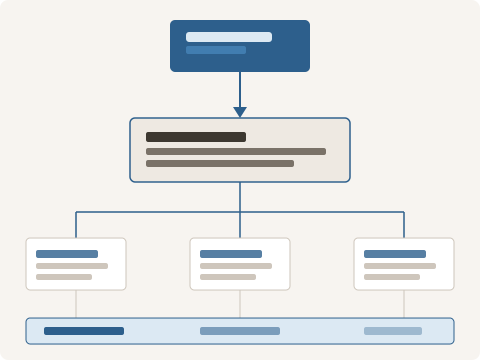
The diagram opposite illustrates how information moves through the Kestelwick classification process. Content is received, reviewed, and placed within the appropriate category. From there, it is accessible to users navigating that part of the system.
The review layer at the base of the diagram represents the consolidated view available to users: once classified, all content within the system can be accessed through a single, organised interface rather than through separate silos.
Interested in accessing Kestelwick?
Use the enquiry form to describe your requirements and the team will be in touch.